Memory Cards Explained: Speed Classes, Sizes, and What You Actually Need
A clear, technically accurate guide to memory card formats, the confusing speed-class ratings, and how to pick the right card for your camera.
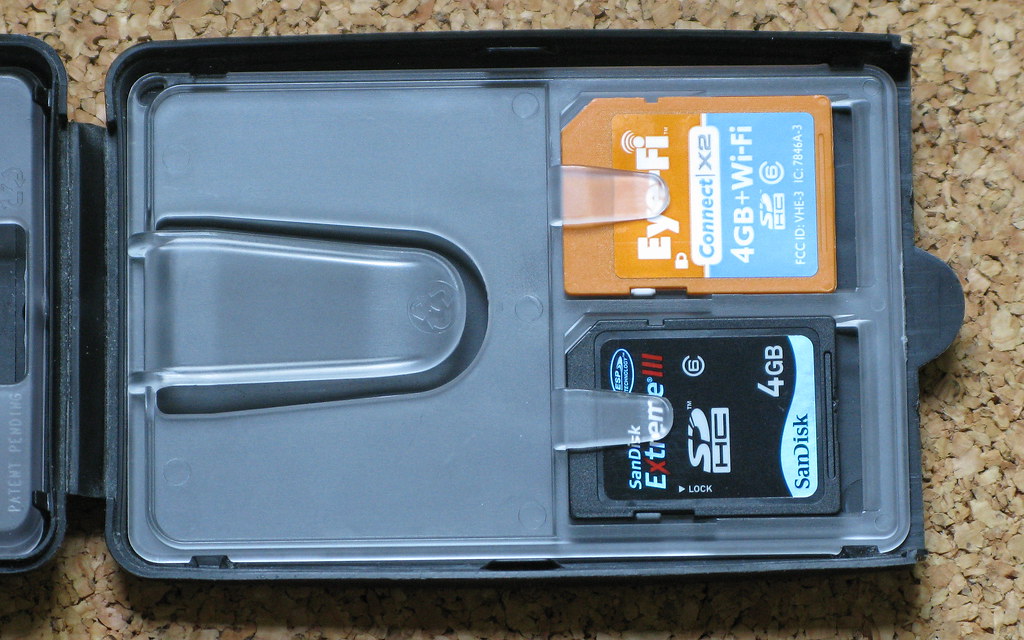
Memory cards are covered in symbols — a Roman numeral here, a number inside a U there, a “V” rating, two different speeds printed in big and small type. It looks deliberately confusing, and to be fair, it sort of is. But underneath the alphabet soup the logic is straightforward, and understanding it stops you from overpaying for speed you can’t use or, worse, buying a card too slow for your camera. Here’s what every label means and how to choose the right card.
The formats: SD, microSD, and CFexpress
SD cards
The standard full-size card most cameras use. You’ll see them labeled by capacity family:
- SDHC — up to 32GB.
- SDXC — 64GB up to 2TB. The most common today.
- SDUC — the newer ultra-capacity standard for very large cards.
A camera built for one family can generally read smaller ones, but a very old camera may not accept the newest cards. Check your manual if in doubt.
microSD
The fingernail-size version, used in action cameras, drones, some compact cameras, and phones. The same speed ratings apply. They usually ship with an adapter so they fit a full-size SD slot. They’re easy to lose and a little more fragile, but otherwise follow the same rules.
CFexpress
A much faster, more expensive format found in higher-end cameras. It’s built for the enormous data rates of high-resolution and high-frame-rate video and very fast burst shooting. CFexpress comes in physical types (commonly Type A and Type B) that are not interchangeable — your camera dictates which it takes. If your camera uses SD, you can ignore CFexpress entirely.
Read speed vs. write speed — and why write speed matters
Every card has two speeds, and they are not the same thing:
- Read speed is how fast data comes off the card — it affects how quickly you transfer photos to your computer.
- Write speed is how fast data goes onto the card — it affects shooting.
Manufacturers love to print the big read speed on the front because it’s the larger, more impressive number. But for photography, write speed is the one that matters, because it determines:
- How long you can shoot a burst before the camera’s buffer fills and it stalls.
- Whether you can record high-bitrate video without the camera stopping or dropping frames.
A card with a blazing read speed but a modest write speed can still choke your camera. The speed-class ratings below exist precisely to guarantee a minimum sustained write speed — which is what you actually need to trust.
The speed-class ratings, decoded
There are three overlapping systems on SD cards. They measure related things, which is why they’re confusing. Here’s each one.
UHS Bus (the Roman numeral)
A I or II (sometimes III) marks the bus — the maximum theoretical pipe the card can use, set by its row of pins.
- UHS-I is the common, affordable tier.
- UHS-II has a second row of pins and a much higher ceiling, useful for fast burst and high-end video — but only if your camera also has UHS-II contacts. Put a UHS-II card in a UHS-I camera and it works, just at UHS-I speeds.
The Roman numeral describes potential, not guaranteed write speed. For that, look at the next two.
Speed Class and UHS Speed Class
These guarantee a minimum sustained write speed, which is what video especially depends on:
- Speed Class: a number inside a C shape — Class 10 guarantees at least 10 MB/s.
- UHS Speed Class: a number inside a U shape — U1 = 10 MB/s minimum, U3 = 30 MB/s minimum.
Video Speed Class (the “V” rating)
The clearest modern label, designed for video. A V followed by a number states the guaranteed minimum write speed in MB/s:
- V6 / V10 — basic video.
- V30 — comfortably handles common 4K video. A great all-around target for most enthusiasts.
- V60 / V90 — high-bitrate 4K and 8K, fast professional bursts.
So a single card might read “UHS-II, U3, V60”: the bus is UHS-II, and it guarantees at least 30 MB/s (U3) and, more specifically, 60 MB/s (V60) of sustained write speed.
How much capacity should you buy?
Bigger isn’t automatically better. The smart approach balances convenience against risk:
- Don’t put all your eggs in one basket. If a single huge card fails or is lost, the entire shoot goes with it. Several medium cards spread the risk.
- Match capacity to what you do. Casual JPEG shooters need little. RAW shooters and videographers eat space fast and need more.
- A practical sweet spot for most enthusiasts is a couple of mid-size cards rather than one giant one — enough for a full day, small enough that losing one isn’t a catastrophe.
Reliability, counterfeits, and care
A memory card holds your only copy of an image until you back it up, so trust matters more than saving a few dollars.
- Buy genuine, from reputable sellers. Counterfeit cards — fakes printed with high ratings but cheap, slow, unreliable innards — are common in marketplaces. Stick to well-known brands and trusted retailers.
- Format in the camera, not the computer. Use the camera’s format function to set up a card correctly, and reformat (rather than just deleting) periodically to keep the file system clean. Always confirm you’ve backed up first.
- Eject safely before pulling a card from a computer to avoid corruption.
- Treat cards gently: keep them in a case, away from heat, moisture, magnets, and static. They’re robust but not indestructible.
- Replace aging cards. Memory has a finite number of write cycles; a heavily used card from years ago is worth retiring before it fails on an important day.
A quick note for phone photographers
Most modern phones have no memory card slot — storage is built in and fixed. If yours does take a microSD card (common on some Android models, action cameras, and drones), the exact same V-ratings apply: aim for V30 or higher if you shoot 4K video, and buy genuine cards from trusted sellers. For phones without a slot, your “memory card strategy” is really a backup strategy: cloud sync plus an occasional copy to a computer or drive.
How to pick: a simple recipe
- Casual photos, JPEG: any genuine Class 10 / U1 card from a known brand is fine.
- RAW photos and 4K video: target U3 / V30 at minimum.
- Fast bursts, high-bitrate or 8K video: step up to V60 or V90, and UHS-II if your camera supports it.
- CFexpress cameras: buy the exact type your camera specifies — there’s no choice to agonize over.
The bottom line
Ignore the big read-speed number on the front and read the small print: the V-rating (or U-class) tells you the guaranteed write speed, which is what keeps your bursts and video flowing. Buy genuine cards from trusted sellers, choose V30 or better unless you have a specific high-end need, and own a couple of medium cards instead of one giant one. Get those few things right and your memory cards will simply disappear into the background — exactly as they should.