The Smartphone Photography Gear That's Genuinely Worth It
Honest picks for the phone photography accessories that meaningfully improve your shots, plus the gimmicks you can skip.
Your phone is already an extraordinary camera. The sensors are small, but the software doing the heavy lifting — merging frames, taming highlights, sharpening detail — is genuinely brilliant, and for most situations it’s all you need. So the question with phone accessories isn’t “what can I buy?” It’s “what actually removes a limitation the phone can’t solve in software?” A surprising amount of phone gear is solving problems your phone already handles. Here’s what’s genuinely worth your money, and what’s mostly marketing.
The gear that genuinely helps
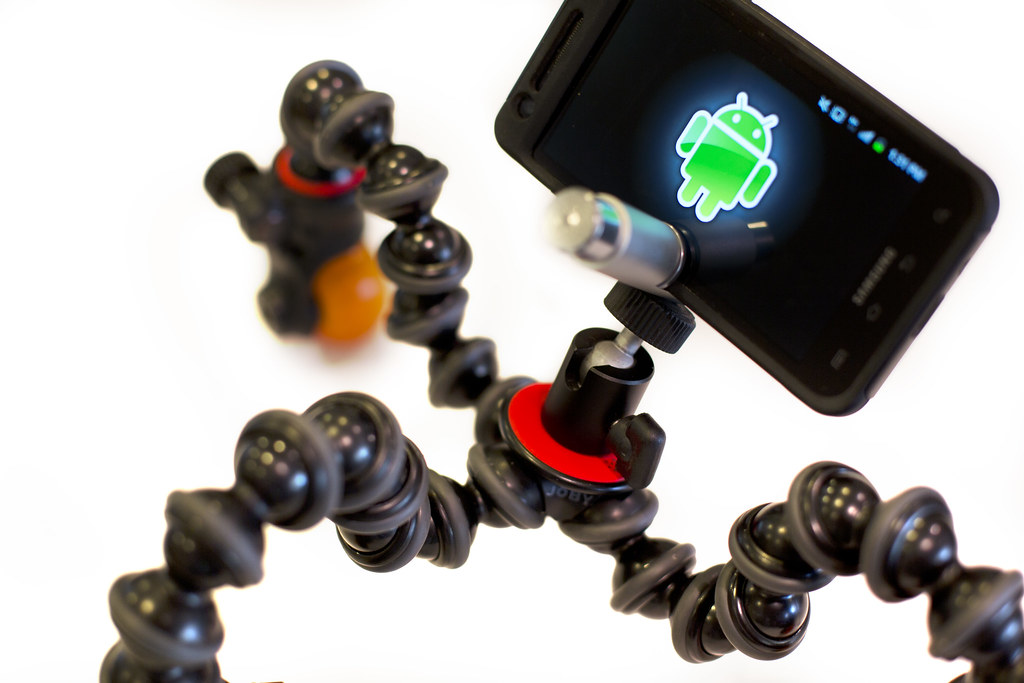
A compact tripod and phone mount
This is the highest-value purchase on the list, because steadiness is the one thing software can’t fully fake. A tripod unlocks photography your hands can’t:
- Low light and night mode. Phone night modes work by holding the shutter open and stacking frames over a second or more. Handheld, you get softness; on a tripod, you get crisp, clean low-light shots the phone otherwise can’t deliver.
- Long exposures for light trails, smooth water, and star shots.
- Self-portraits, group photos, and video without propping the phone against a coffee cup.
You don’t need anything huge. A small, sturdy tabletop tripod or a flexible-leg model that wraps around railings covers most needs. The non-negotiable part is a solid phone clamp — a wobbly or loose mount ruins the whole point. Pair it with the phone’s built-in self-timer or a remote (below) so you don’t shake the phone tapping the screen.
A Bluetooth shutter remote
Tiny, cheap, and genuinely useful. It triggers your phone’s shutter from a few feet away, which matters because tapping the screen shakes the phone — exactly when you’ve gone to the trouble of stabilizing it on a tripod. Use it for:
- Tripod shots in low light, where any shake shows.
- Group photos and self-portraits without a frantic dash from the timer.
- Discreet candid shooting.
If you’d rather not buy hardware, your phone’s volume button or earbud remote often fires the shutter too — test that first.
A small LED light
Phones struggle most when there isn’t enough light, and no software trick beats simply adding some. A compact, rechargeable LED panel gives you:
- Better portraits — soft, directional light is far more flattering than a phone’s harsh built-in flash, which you should almost always avoid.
- Control over color and warmth on the better models.
- Fill light for close-ups, food, and products.
Even a modest light, held or clipped just off to the side, transforms a dim indoor photo. It’s one of the most underrated phone accessories.
Clip-on ND and polarizer filters
These do things software genuinely cannot, because they alter the light before it hits the sensor:
- A polarizer cuts reflections off glass and water and deepens skies — you simply can’t reliably remove a reflection in editing once it’s baked in.
- An ND filter blocks light so you can shoot long exposures (silky water, motion blur) in daylight without the image blowing out.
The catch is fit and quality: a clip filter has to align precisely over the right lens (tricky on multi-camera phones) and use decent glass, or it softens everything. Worth it if you specifically want reflection control or long exposures; otherwise skippable.
Storage and backup
Not glamorous, but the most important “accessory” of all — because the photos you lose are gone for good. Phones rarely have memory card slots, so your strategy is about getting images off the phone safely:
- Automatic cloud backup so photos sync the moment you take them.
- A periodic copy to a computer or external drive, or a small plug-in storage device for offloading on the road.
- The simple rule: an important photo should exist in more than one place. One copy is not a backup.
Get this right before you spend a cent on lenses or lights.
The gear to think twice about
Clip-on lenses
The most heavily marketed phone accessory, and the one to be most skeptical of. The idea is appealing — wide-angle, macro, fisheye, or telephoto glass that clips over your phone’s lens. The reality is mixed:
- Optical quality is the problem. A cheap extra lens placed in front of a precisely engineered phone camera often adds softness, distortion, color fringing, and glare — especially toward the edges.
- Your phone may already have it. Most modern phones include an ultra-wide and a telephoto camera, so a clip-on wide or zoom lens often duplicates hardware you own.
- Alignment is fiddly, and the clip can scratch your phone or slip out of place.
Where a clip-on can earn its keep is macro — true close-up photography most phones don’t do well — and that’s the one type worth considering. For everything else, the built-in lenses usually win. If you do buy, invest in a quality lens with a secure mount; the bargain kits are almost always disappointing.
Phone “camera grips” and gimbals — it depends
A grip with a physical shutter button can make one-handed shooting more comfortable, and a motorized gimbal genuinely smooths handheld video. But for stills, most people don’t need either. Buy a gimbal only if video is a real focus for you; otherwise the tripod and remote cover stills far more cheaply.
Anything promising to “10x your photos”
Be wary of accessories sold on dramatic before-and-after claims. The biggest improvements in phone photography are free: clean the lens, use the gridlines for composition, lock focus and exposure with a tap-and-hold, shoot in good light, and learn your phone’s Pro or RAW mode. No accessory replaces those habits.
What to buy: a quick guide
- Buy first: a sturdy compact tripod with a solid phone clamp, and a Bluetooth shutter remote. Cheap, and they unlock low-light and self-timer photography immediately.
- Buy next: a small LED light if you shoot people, food, or products indoors.
- Buy if you have a specific need: clip-on ND/polarizer filters for long exposures and reflection control; a quality macro clip-on for close-ups.
- Sort out regardless: automatic backup so you never lose a photo.
- Skip unless you’re sure: wide/zoom clip-on lenses (your phone likely has them), gimbals (unless video is your thing), and anything sold on miracle claims.
The bottom line
The best phone photography gear solves problems software can’t: shake (a tripod and remote), too little light (an LED), and reflections or long exposures (filters). Those few inexpensive items genuinely raise your photos. Most clip-on lenses, by contrast, fight against camera hardware that’s already very good. Spend on stability and light, lock down your backups, and put the rest of your energy into the free habits — clean lens, good light, deliberate composition — that improve every shot you take.